The iPhone Duo teleprompter that follows your voice.
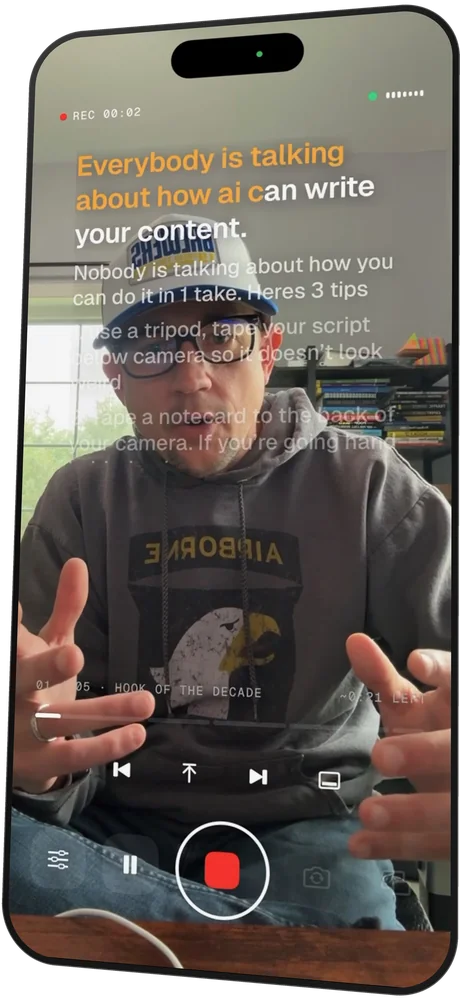
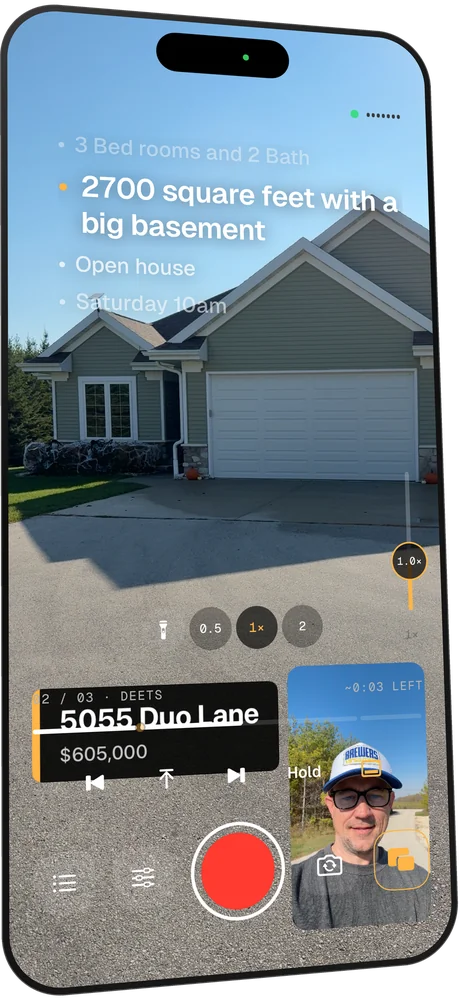
DuoPrompt scrolls your script as you speak and waits when you pause. Half-fold your iPhone Duo on a table and the words sit right next to the camera, so you keep eye contact while you read. With Duo Camera, film yourself and what you're showing in the same take.
Get it the day it launches
One email when it's on the App Store. No spam.
Join 354 people waiting for launch day.
- Free to download
- No account
- Your voice stays on your iPhone
- Front + back cameras at once
DuoPrompt is a voice-activated teleprompter app for iPhone. It listens as you read, highlights each word you say, and on iPhone Duo puts the script on the camera half of the screen.
See it in action
Real screens from DuoPrompt.
Recorded on an iPhone: the script right under the lens, AdLib talking points, Duo Camera, captions built from your script, and graphics that pop up on cue.
 Script right under the lens
 Scrolls when you talk
 AdLib Mode: talking points
 Duo Camera: front + back
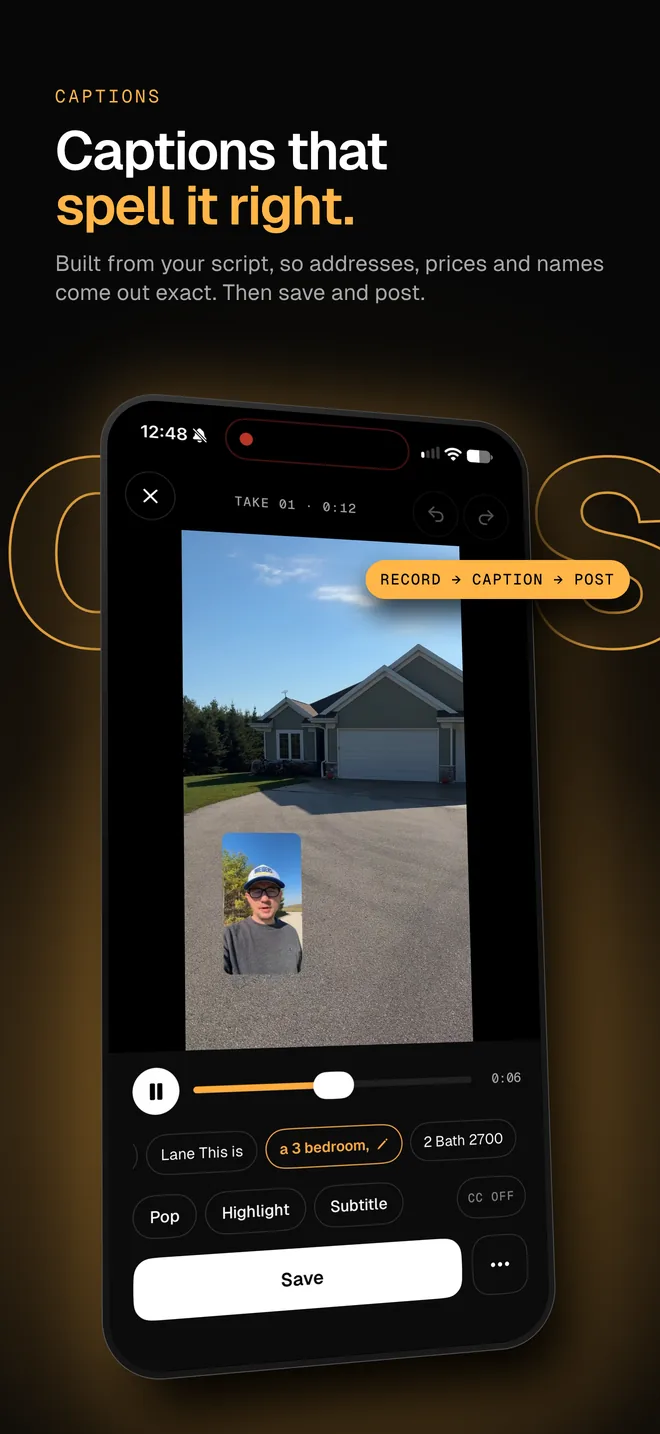
Captions from your script
 Graphics on cue
DuoPrompt at a glance
- What it is
- A voice-activated teleprompter app for iPhone
- Built for
- iPhone Duo, Apple's foldable iPhone (iOS 27.1)
- Also runs on
- Every iPhone with iOS 26 or later
- Price
- Free download. Pro is $19.99/month after a 7-day free trial, or a one-time $97 lifetime license offered in-app.
- Duo Camera
- Front + back cameras in one take (Pro)
- Privacy
- No account. Voice is processed on your iPhone
Why it exists
Fixed-speed teleprompters make you chase the words.
Go a little slow and the script runs away. Pause to breathe and you're lost. Look down at your notes and your viewer sees it. DuoPrompt fixes all three by following you instead of a timer.
How it works
Three steps to a take you don't have to redo.
- 1
Paste your script
Type it, paste it, or start from a hook template. Add "## Hook" style lines to split it into sections.
- 2
Half-fold and hit record
Stand your iPhone Duo on the desk. The script jumps to the half with the camera; the controls move to the half on the table.
- 3
Just talk
Each word lights up as you say it. Pause and it waits. Skip a word or ad-lib and it catches up.
Features
Everything a talking-head video needs. Nothing it doesn't.
Read without fighting a scroll speed
On-device speech recognition matches what you say to the script, word by word. No foot pedal, no remote, no fixed scroll speed to fight.
Keep eye contact while you read
On iPhone Duo the script sits just to the right of the front camera, so you look at your viewer while you read, not at your notes.
Film the room and your face in one take
Record the front and back cameras in one take: you, plus what you're showing, with no editing. Resize, drag or swap the picture-in-picture mid-take. (Pro)
Hit your talking points without a script
Rather not read word for word? Load short talking points instead of a script. DuoPrompt moves to the next point when you get there, by voice or with a tap.
Post with captions that spell names right
Stop a take and captions are already built, spelled the way your script spells names, prices and codes. Pick a style, drag them into place, save and post.
Set a steady pace if you prefer
Prefer manual scroll? Set your pace in words per minute and tap − or + mid-take. DuoPrompt measures your natural pace during setup.
Always know how much is left
See where you are in the hook, the body and the call to action. Tap a section to jump straight to it.
Add the address lower third without an editor
Lower thirds, a logo, a promo-code card or a QR code, burned into the take. Put [show: Promo code] in your script and it pops up when you say that line. (Pro)
Cut a long script to 60 seconds
Script too long? Tighten rewrites it to 30 seconds, a minute or two, in your tone, with Apple's on-device model. Nothing leaves your iPhone.
Skip the export step
Front-camera video, saved the moment you stop. Works with glass teleprompter rigs too, with mirrored text.
iPhone Duo
Made for the way a foldable sits on a desk.
DuoPrompt reads the hinge. Half-fold your iPhone Duo and the layout splits exactly on the crease: script on the camera half, controls on the half lying flat. Nothing you tap ever sits on the fold.
Switches to tabletop mode automatically when you half-fold
Splits on the real fold, whichever way your phone is turned
Keeps the script on the half with the camera
Falls back to a clean split screen on every other iPhone
How to use iPhone Duo as a teleprompter →iPhone Duo setup for YouTube and TikTok →Compare
DuoPrompt vs. the usual ways to read on camera
| Feature | DuoPrompt | Fixed-speed teleprompter | Reading from Notes |
|---|---|---|---|
| Scrolls at your speaking pace | Yes | No | No |
| Waits when you pause | Yes | No | No |
| Script sits right next to the camera on iPhone Duo | Yes | No | No |
| Hands-free, no remote needed | Yes | No | No |
| Records while you read | Yes | Yes | No |
| Front and back cameras in one take | Yes | No | No |
Why I built this
I built DuoPrompt for my wife.
She sells skincare, and video is how she sells it. But she always struggled with her lines in front of the camera, and honestly, she hated being on camera at all.
So I built her a teleprompter that follows her voice. It gave her the confidence to stop dreading it. Now she records 5 to 10 videos a week, without cringing.
Steve Delarwelle, founder of DuoPrompt
FAQ
Questions people ask
What is DuoPrompt?
DuoPrompt is a teleprompter app for iPhone that scrolls your script as you speak and pauses when you stop. It was built for iPhone Duo: stand the phone half-folded on a table and the script sits on the top half, right next to the camera, while the record button and controls sit on the bottom half.
Can I use iPhone Duo as a teleprompter?
Yes. Half-fold your iPhone Duo, stand it on a desk, and open a script in DuoPrompt. The app detects the fold, puts your script on the half with the camera so your eyes stay near the lens, and moves the controls to the other half, away from the crease.
What is a voice-activated teleprompter?
A voice-activated teleprompter listens to you read and scrolls the script to match your voice instead of scrolling at a fixed speed. DuoPrompt highlights each word as you say it, keeps up if you skip a word or ad-lib, and waits when you pause, so you never chase the text or wait for it.
How does it handle ad-libs and re-takes?
Voice-follow matches the last few words you said against the script just ahead of you, so a skipped word, a misheard word or a quick ad-lib doesn't lose your place: the next line you read pulls it right back on track. It only ever moves forward, so repeating yourself can't make it jump around; for a full re-take, tap back a section or back to the top and start again. If you go off script for longer, it creeps forward gently until your words match again.
Does voice-follow work in noisy rooms?
Yes, within reason. DuoPrompt turns on Apple's voice processing by default, which cuts background noise and echo before speech recognition hears it, and a mic button on the prompter opens iOS Voice Isolation, which is what we use when recording in noisy rooms. It also listens for the distinctive words in your script, like names and numbers. For a busy room, a lavalier or wireless mic close to your mouth helps most. If it ever lags, it creeps forward at your pace until it locks back on, and Manual scroll is one tap away.
Does DuoPrompt work on iPhones that don't fold?
Yes. DuoPrompt runs on any iPhone with iOS 26 or later. On a regular iPhone you get the same voice-follow prompter in a full-screen or split layout, and on iPhone Duo it adds fold-aware tabletop mode.
What is Duo Camera?
Duo Camera is DuoPrompt Pro's headline feature: it records the front and back cameras in one take, so you get yourself plus what you're showing, with no editing. The second camera sits as a picture-in-picture you can resize, drag and swap mid-take. It works on iPhone XS and later.
Is my voice recorded or uploaded?
No. DuoPrompt never sends your voice to us. Voice-follow uses Apple's speech recognition and requires on-device processing on iPhones that support it, so your audio stays on your phone. Your scripts are stored on your phone too, and DuoPrompt doesn't require an account.
How much does DuoPrompt cost?
DuoPrompt is a free download. Pro is $19.99/month after a 7-day free trial, or a one-time $97 lifetime license offered in the app. Pro removes every limit and adds voice-follow, Duo Camera, every caption style, Tighten and on-screen graphics.
What's included in the free version?
The free version includes the manual-scroll teleprompter, the iPhone Duo tabletop layout, the camera preview, Pop-style auto-captions and one script template for each kind of video. Free accounts hold 1 script, takes stop at 30 seconds, and saved videos carry a small getDuoPrompt.com watermark. Voice-follow, Duo Camera, Tighten and on-screen graphics are Pro.

Your next video, first take.
DuoPrompt launches alongside iPhone Duo. Get one email the day it's on the App Store.
One email at launch. No spam.